
fr24feed in Docker

I'm tired of keeping track of all the hacks I needed to introduce to my Arch Linux installation on my Raspberry Pi to get fr24feed running, so here's a Docker configuration.
Usage
-
Type in your sharing key in fr24feed/fr24feed.ini.
fr24key="0123456789abcdef" -
Edit dump1090/config.js to set the correct coordinates of the receiver.
DefaultCenterLat = 66.5; DefaultCenterLon = 25.19; SiteShow = true; SiteLat = 66.5; SiteLon = 25.19; SiteName = "My receiver"; -
Edit dump1090/supervisord.conf to set the correct coordinates of the receiver in dump1090-fa's arguments (
--latand--lon).command=/usr/bin/dump1090-fa ... --lat 66.5 --lon 25.19 ...
Start the containers using
docker compose up -d
You can now access the interactive map at http://127.0.0.1:8080/dump1090-fa/ and the fr24feed web interface at http://127.0.0.1:8754/.
Stop the containers using
docker compose down
Signup
If you need to configure your feed for the first time, run
docker run -it --rm egortensin/fr24feed bash
Inside the container:
rm /etc/fr24feed.ini
# ^^^ Otherwise, the next command might fail with an SSL connection error
./fr24feed --signup
Then follow the instructions and update your fr24feed.ini with your new sharing key.
DVB-T dongles
They can be bought on eBay and AliExpress for a few dollars. This is what they look like:
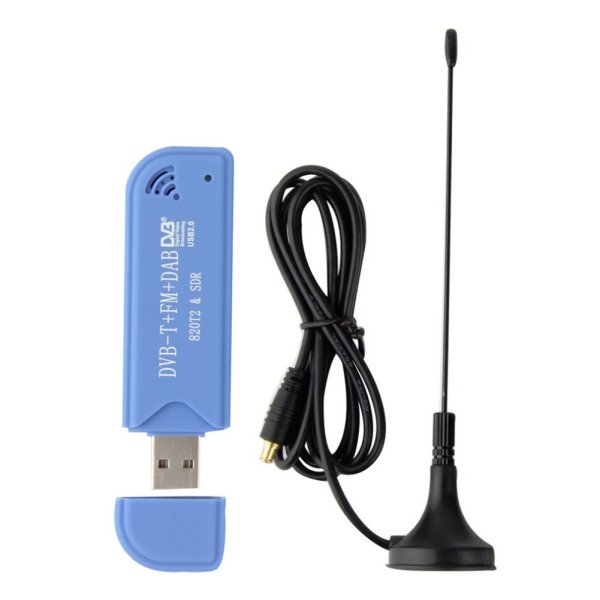
You have to be careful not to buy the wrong one though. All of them are equipped with tuners, some of which don't support the 1090 MHz frequency. I've made the mistake to buy dongles with the FC0012 tuner, which doesn't support it. In general, you'll see something like
[FC0012] no valid PLL combination found for 1090000000 Hz!
in dump1090 container output if your dongle isn't supported.